
Highlight Hugo-Html templates
A language grammar to highlight Hugo’s templating language with Highlight.js.
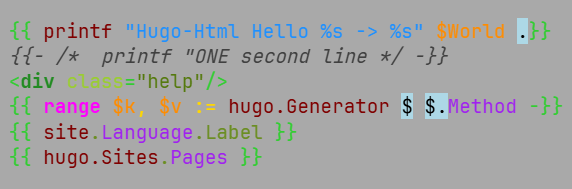
Requirements
The module has been implemented using Highlight.js version 11.11.1. It will most likely not work with an older version.
Download
Packages can be downloaded from: Releases1.
- Ready to use javascripts: highlightjs-hugo-jsmodules.zip
- Grammar sources to build on your own: highlightjs-hugo-extra-src.zip
Usage
Include the highlight.js library in your webpage or Node app, then load this module.
Static website or simple usage
Load the module after loading highlight.js.
<script type="text/javascript" src="/path/to/highlight.min.js"></script>
<script type="text/javascript" src="/path/to/hugo-html.min.js"></script>
<script type="text/javascript">
   hljs.highlightAll();
</script>
Using a CDN
As of now we do not publish anything to a CDN.
With Node or another build system
There’s no official node packages. You will have to build from source
The Node description is just copy&paste from a readme example!!!
If you’re using Node / Webpack / Rollup / Browserify, etc, simply require the language module, then
register it with highlight.js.
var hljs = require("highlight.js");
var hljsHugo = require("hugo-html");
hljs.registerLanguage("hugo-html", hljsHugo);
hljs.highlightAll();
Example code
Enclose your code in <pre><code> tags and at best set the language with class="hugo-html". If
you want to rely on auto detection, read the section about that below.
<pre><code class="hugo-html">
<title>{{.Title}}</title>
</code></pre>
A word on auto detection
Handlebars and Go templates (used by Hugo) have similar template tags. Without additional
relevance settings Hugo grammars will loose most of the time. Relevance settings are used to beat
Handlebars auto-detection – doing best to make it possible to have both grammars loaded at the
same time. Importing both hugo-text and hugo-html may result in undetermined auto-detection.
To be on the safe side specify the language you want for every code block.
Go template comments get relevance = 10.
comments start with
{{/*or{{- /*and end with*/}}or*/ -}}Functions in the hugo namespace get relevance = 10 (e.g. hugo.IsDevelopment)
The following Handlebars opening template tags are set to invalid for hugo:
{{#,{{>,{{!--,{{!IgnoreIllegalsdefault value isfalsesince version 11. So this stops highlighting with the hugo module.
Build your own
The module works with the standard Highlight.js extra build system. Download the grammar source
from our Releases page and copy it to the highlight.js/extra directory. Check out the
Highlight.js documentation for more details.
License
This package is released under the MIT License. See LICENSE file for details.
The Site logo, icons, pictures, … and it’s derivate are (c) 2026 Irkode and not MIT licensed. To state it simple every image that does not contribute in understanding the Documentation or Code.
Author
- Irkode irkode@rikode.de
Links
- highlightjs-hugo : The main repository with additional grammars and plugins. Have a look
- Documentation : All about Highlight 4 Hugo
- Highlight.js : The Internet’s favorite JavaScript syntax highlighter supporting Node.js and the web
- Hugo : The world’s fastest framework for building websites
- Go HTML template : Go’s html template package
- Go TEXT template : Go’s text template package
Draft- and pre-releases have to be manually browsed and downloaded. ↩︎